
BUILT FOR CONTINUOUS OPERATIONS

Grip on every
shift.

The right people. The right skills.
Every shift, again.

From planning and leave to staffing and qualifications. One central overview for teams that keep operations running.

THE OPERATION IN ONE VIEWPRODUCT PREVIEW / 01
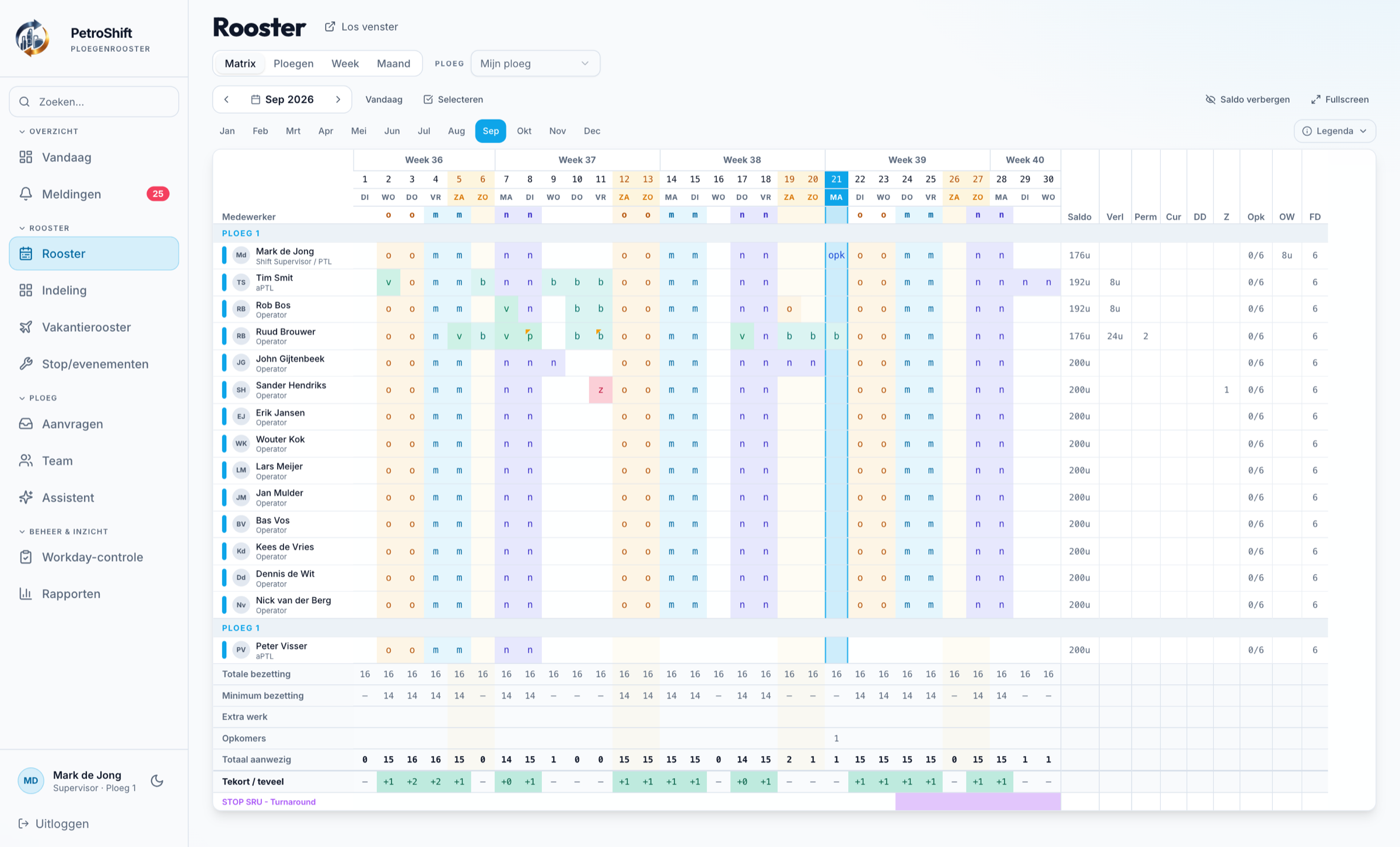
PetroShift roster: monthly matrix for September 2026 with employees, morning, afternoon and night shifts, leave, staffing and shortages.

Tap the dots for details.

View full size

This example shows a 5-team 2-2-2 roster — other shift patterns and on-call days are supported just as well.

Built for a workday that never stops.
24/7 OPERATIONSMULTIPLE TEAMSONE OVERVIEWAPP COMING SOON TO APP STORE & GOOGLE PLAY
WHERE CONTINUITY MATTERS
Process industry Chemicals & energy Terminals & logistics Manufacturing
01 / FROM COMPLEXITY TO CONTROL

Operations don’t stop.
Your planning has to keep up.

A sick day. A leave request. An expiring qualification. One change can affect the whole team.

When your planning is spread across spreadsheets, messages and separate systems, you lose the full picture. PetroShift brings together the information you need to act.

FRAGMENTEDRosters in spreadsheetsLeave via separate messagesSkills in separate overviews
CONNECTED One up-to-date planning view Requests in context People and qualifications
02 / THE PLATFORM

Everything around your team.
Nothing falls through the cracks.

From the first roster change to the full picture for the supervisor. More coherence in every decision.

01

Shift planning

Every shift pattern — not just 2-2-2 — including on-call days. Bring cycles, changes and availability together in one roster that matches the reality of the shop floor.

02

Leave & absence

Review requests with staffing in view. See what a day off means for the rest of the team.

03

Overtime made visible

Make extra hours visible per employee and team. Base decisions on overview instead of loose lists.

04

Staffing per shift

See where people are needed and which team has room. Focus attention on the shifts that need it.

05

Skills & qualifications

Look beyond headcount. Factor in the required skills and the validity of qualifications in your planning.

06

Positioning per shift

Assign people to the right installation and position for each shift — with an automatic suggestion that fills as many positions as possible.

07

Swaps & team transfers

From a one-off swap between two shifts to a permanent move to another team — always with approval and without gaps in the roster.

08

Arrange replacements

Invite a replacement for an open shift and let them confirm or decline themselves — no more phoning around.

09

One view per role

An operational view that takes work off the supervisor’s hands, and a central overview for admins. The relevant information in one place, with configurable permissions per role.

HOW IT WORKS
  1. 01

    Set up your teams

    Choose your shift pattern, staffing requirements, roles and skills. Sector templates give you a workable starting point that you adjust yourself.

  2. 02

    Plan and staff

    The roster is calculated from your pattern. The matrix shows staffing, the minimum, leave and shortages per day.

  3. 03

    Handle changes

    Leave, swaps, replacements and cover run through requests with approval, with rest-time checks.

  4. 04

    Keep the overview

    Dashboard, notifications and reports per role, plus a calendar feed so employees see their shifts in their own calendar.

IN PICTURES

Four features up close

Assignment per position

Fill in the whole run of shifts on one screen. Assign people to unit and position per shift, with stars for the qualification level and an automatic suggestion that fills as many positions as possible.
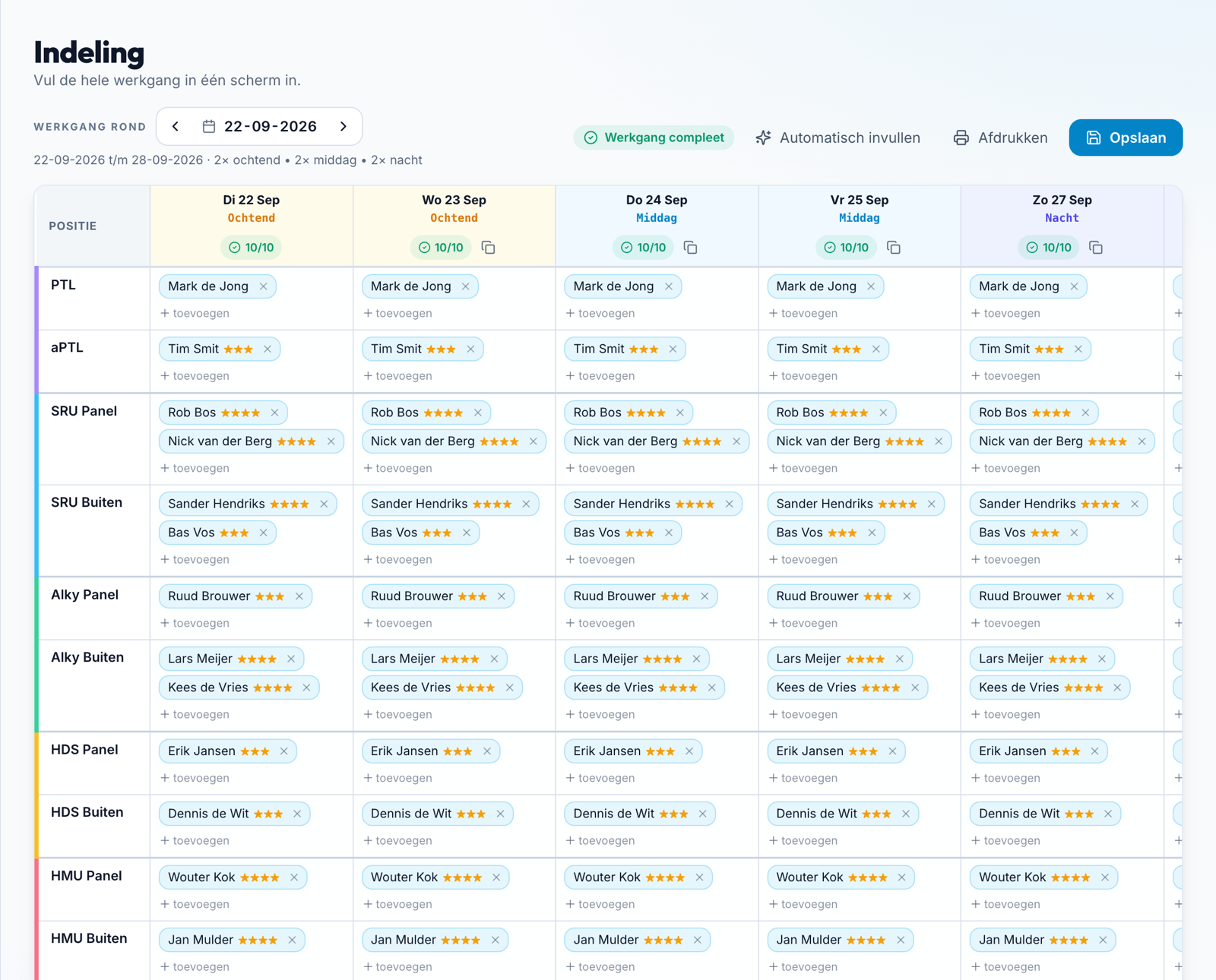
Assignment: run of shifts with the positions PTL, deputy supervisor and units per shift, filled with employees and stars for qualification level.

Holiday roster

Analyse in one go whether staffing holds for a whole holiday period. Where it gets tight, PetroShift proposes cover and shift swaps, and the calendar shows per employee what is in draft.
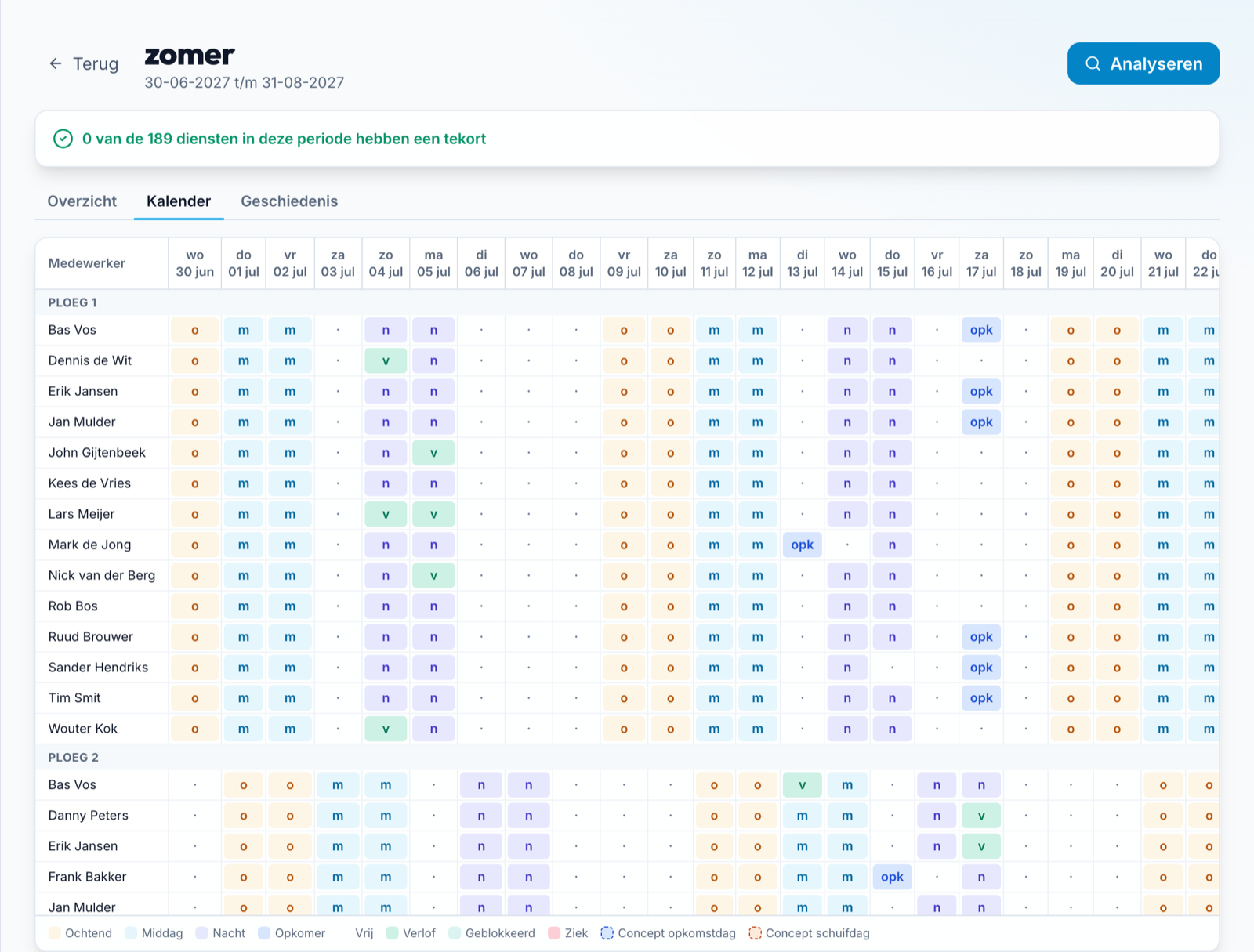
Holiday roster: calendar per employee with shifts, leave and on-call days, and the message that 0 of 189 shifts have a shortage.

Shutdowns and events

Plan a company-wide shutdown per day in a familiar matrix, with participants from all teams and a rest check on every assignment. Afterwards you process the hours worked as overtime.
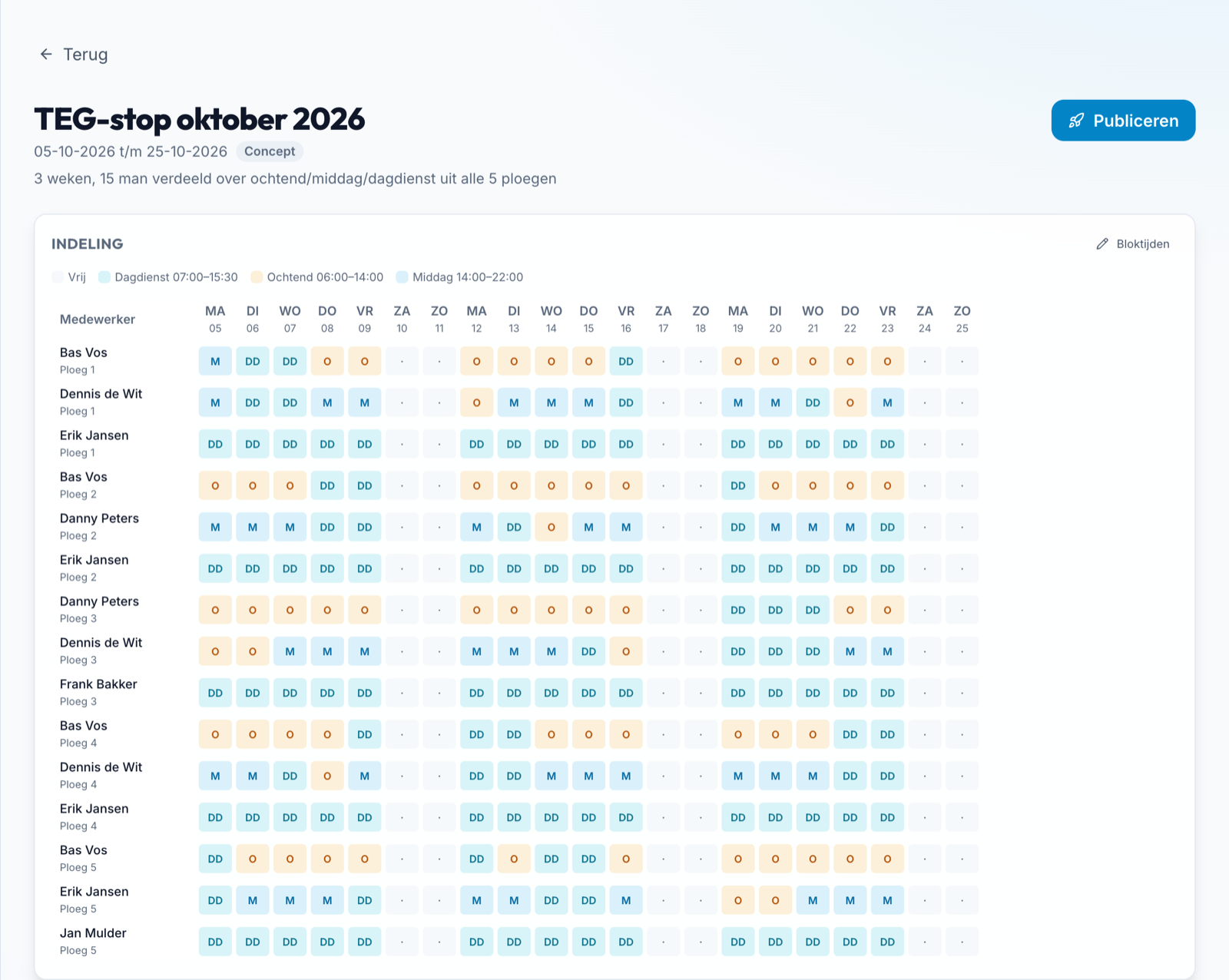
Shutdown planning: matrix of participants and days with day shift, morning and afternoon.

AI assistant for supervisors

Ask in plain language, such as “Who can cover tomorrow afternoon?”. The assistant looks through the roster, checks rest, leave and qualifications, and never changes anything itself. Optional per company.
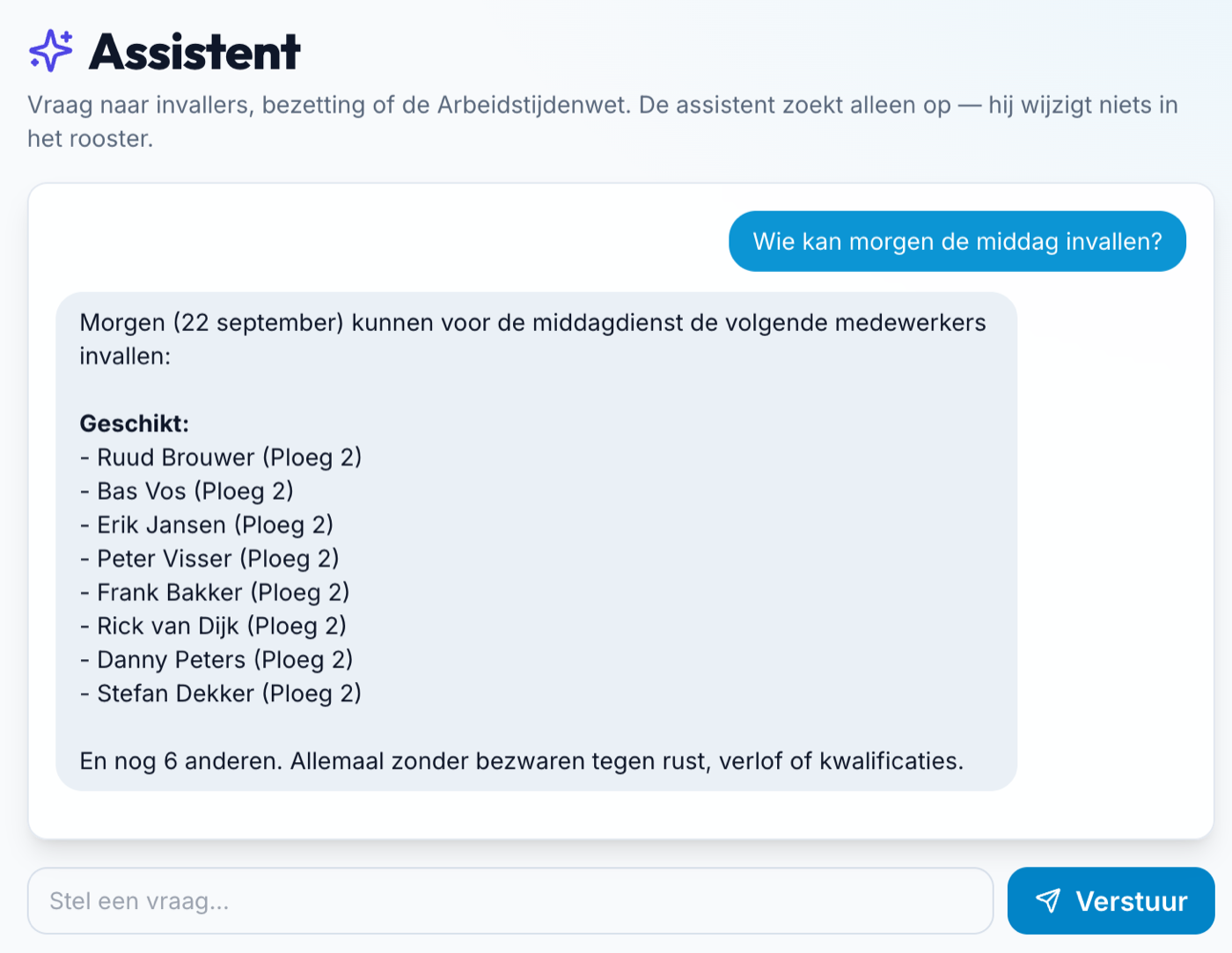
The assistant answers who can cover tomorrow afternoon with a list of suitable employees.
MORE ABOUT PETROSHIFT

Everything else you get

Planning and staffing

Holiday rosterNew
Analyse staffing per holiday period and let PetroShift propose cover and shift swaps. With automatic fill and progress, a fairness overview per person and re-planning after publishing.
Shutdowns and eventsNew
Plan a company-wide shutdown per day in a familiar matrix, with rest checks. Record worked hours per participant and process them as overtime.
Cover and open shifts
When short-staffed, find cover from the roster in a ranked list based on availability, rest time and overtime hours. Employees apply for an open shift and the supervisor approves.
Qualification levels 1 to 4New
From shadowing to senior, including the deputy supervisor slot. A shadowing employee counts as an extra person and does not cover a position.
Rest-time checks where you planNew
The working-time rules apply in the roster, the holiday roster and shutdown planning. When swapping, PetroShift makes sure the colleague’s shift stays covered.
Public holidays
Official Dutch public holidays appear in the roster and holidays worked are counted per employee.
Smart roster matrixNew
Today’s column clearly highlighted, cell comments like in Excel, a separate window and keyboard control.

Requests and employees

One list for requestsNew
Everything waiting for a supervisor, sorted by date, with filters per type: leave, replacement, swap or team change.
Leave balance in hours
Employees enter their current Workday balance and PetroShift calculates the annual total in hours.
My overview
Upcoming shifts, leave and on-call meters, holidays worked and who relieves you.
Notifications and calendar
Notifications per category via push, WhatsApp or email, and a personal calendar feed for Apple, Outlook or Google.

Insight and help

Reports and automation in numbersNew
Reports on absence, leave, overtime and staffing with CSV export. The KPI dashboard also shows how many holiday and shutdown shifts were planned automatically.
AI assistant for supervisorsNew
Optional and read-only: ask about employees, cover, rest times and a day’s staffing.
Report a problem in the app
Employees report an issue directly with a selection on the screen.

Setup and administration

Onboarding with sector templates
A wizard with a workable starting point for roster, staffing, roles and skills, which you adjust yourself.
Modules per company
Switch on only what you need. The roster itself is the foundation.
Roles and permissions
Operator, supervisor, deputy supervisor, department and company admin, with configurable permissions and a dedicated view per role.
Audit log and separated data
Changes are recorded and each company works with its own data.

Access and privacy

Two-step verificationNew
Optional, with backup codes and rate-limited sign-in attempts.
Sign in with MicrosoftNew
Entra ID (OpenID Connect) is available on request, for existing accounts only.
Manage your own dataNew
Employees export their own data and can have their account deleted (GDPR).
Install as an appNew
Shortcuts to roster, requests and notifications, with install help for Android and iPhone.

Automatic notifications via WhatsApp, push (in the app) or email — configurable per employee.

Reports on absence, leave, overtime and staffing, with CSV export for Excel.

03 / FROM INSIGHT TO ACTION

See what’s happening.
Know where you’re needed.

Good planning goes beyond a filled roster. Bring availability, staffing and skills together before the next shift starts.

SUPERVISOR VIEW
REQUESTS / TODAY

Leave, with the full picture.

SB
Sanne BakkerField operator · Team B
Pending
Requested leaveSeptember 18, 2026
Availability in view
Team skills visible
Check the impact on the late shift before approving.
INSIGHT BEFORE YOU DECIDE Illustrative product mockup
04 / FOR THE PEOPLE BEHIND THE OPERATION

Same operation.
Each their own view.

From the shop floor to central management. With information that matches the responsibility.

01Supervisors

Calm in day-to-day operations.

Oversee the team, review requests and stay on top of changes before the shift starts — less manual digging, more time for the team.

Team overview / Requests / Staffing / Less workload
02Planners & operations

Looking ahead with the full picture.

Bring rosters, availability and skills together. Spot bottlenecks and align planning across teams.

Shift planning / Capacity / Skills
03Admins & HR

Coherence in management.

Connect operational needs with employee data, roles and a consistent setup.

Management / Roles / HR alignment
Jurrien Bolland, founder and owner of PetroShift
FOUNDER & OWNER

Jurrien Bolland

Direct contact with the person building PetroShift — no call center between you and the answers.

05 / FITTING YOUR LANDSCAPE

The shop floor and HR.
Better connected.

Your planning doesn’t stand alone. We discuss how PetroShift can connect with your existing processes and systems.

Security as an implementation requirement

We align access, data processing and management with your IT and privacy team beforehand.

06 / GOOD TO KNOW

Clear questions.
Clear answers.

A different question? Bring it into the conversation about your operation.

Let’s talk
Which organizations is PetroShift for?

For industrial organizations that work with shift teams, such as process industry, energy, chemicals, terminals and manufacturing. The focus is on the coherence between planning, staffing and qualifications.

Can PetroShift fit our shift system?

Yes. PetroShift isn’t locked into one pattern like 2-2-2 — any shift pattern (for example 4- or 5-team shift systems, or your own cycle) can be set up, including on-call days. Your shift cycle, staffing requirements and agreements are the starting point; in a demo we discuss how your situation translates into PetroShift’s setup.

What do supervisors and admins see?

The intended role split gives supervisors insight into their operational planning and requests. Admins get an overarching view and manage the setup. We align the exact access and responsibilities with your organization.

Is there already an integration with Workday?

No, there is no live integration with Workday and data isn’t exchanged automatically. PetroShift does offer a reconciliation step: HR can compare data from PetroShift against Workday and flag discrepancies. A technical integration would need to be researched and agreed on separately.

What about security and personal data?

An implementation requires establishing access rights, hosting, retention periods, logging and data processing agreements, among other things. We discuss these requirements with your IT and privacy team beforehand. This page does not claim any certifications or specific security guarantees.

How do we get started, and what does PetroShift cost?

We start with a conversation about your teams, processes and required functionality. Based on that, scope, any integrations, implementation and price can be determined. This page does not offer fixed rates.

THE NEXT SHIFT STARTS WITH AN OVERVIEW

Ready for more grip
on your operation?

See how PetroShift can fit your teams, processes and daily practice.

Your shift system at the center Room for in-depth questions
View the demo

Request information, no strings attached

We’ll get back to you as soon as possible.